How to Batch-Produce YouTube Videos Without Losing Your Mind
Consistency is the least glamorous part of YouTube and the one that decides the most. Most creators don't fail from lack of ideas; they fail because making one video a week, from blank page to upload, never gets easier. Each video restarts the same chain of tasks, and you pay a context-switching tax every time.
Batching fixes this by grouping the same type of work across several videos. Instead of finishing one video at a time, you write four scripts, record four voiceovers, assemble four timelines, and package four uploads. This guide shows how, with special attention to the step most batching advice glosses over: the edit.
Why batch
Existing guides, such as Trena Little's beginner's guide and BrandGhost's batch model, describe the same shift: rather than filming, editing and publishing one video each week, batch creators dedicate a couple of focused days to production and leave the rest of their time for strategy and community. A typical sprint, per BrandGhost, runs: film everything, then edit, then schedule.
Why it works:
- Context switching is the hidden cost. Setting up a mic, opening a project, rebuilding your mental model of the topic: every setup is overhead you pay once per batch instead of once per video.
- Consistency becomes a buffer. A backlog of finished videos means a bad week doesn't break your schedule. Natasha Lane's batching approach is built around staying consistent "even when life gets hectic."
- Quality gets more even. Recording four voiceovers in one session keeps your tone, mic position and room consistent.
The five batches
Batch by type of work, in this order:
- Research and script. Outline, write and read aloud.
- Voiceover. Record every narration.
- Visual prep. Collect and number assets per video.
- Assembly. Build every timeline.
- Packaging and scheduling. Titles, thumbnails, descriptions, chapters, upload times.
Each batch has a clear definition of done, and each feeds the next.
Build a script bank
Spend one sitting generating 10 to 20 outlines: working titles, a one-sentence thesis, a hook and three to five beats each. Trena Little recommends planning around a series ("bingeable" content) because it helps both strategy and audience. A script bank means you never open a blank page on production day.
Pick the best four for this batch and write them fully, as a two-column table with narration on the left and the visual on the right. (The format is explained in the video essay workflow.)
Record all the voiceover in one session
Record every narration back to back: same microphone position, same room, same gain, one export folder. That gives you matching audio across the batch and saves repeated setup. Leave consistent pauses between sentences; they become the clean cut points downstream. Export each voiceover as its own file named for the video.
Prepare asset folders the batch way
Create one folder per video, each with its assets numbered from 001 with zero-padding and no gaps:
batch-2026-10/
  v1-spreadsheet-error/
    001_hook.mp4
    002_calendar.png
    …
  v2-bridge-collapse/
    001_hook.mp4
    …
That naming is what guarantees a clean one-to-one mapping between sentences and visuals. The rules are covered in How to Align B-Roll and Images to a Voiceover Automatically.
The assembly batch
This is where batching usually breaks down, so it deserves attention. In guides about batching, editing is treated as one undifferentiated block ("edit all videos on day two"). For narration-led channels it's really two things: placing visuals against the voiceover, which is mechanical, and finishing, which is creative. Only one of them needs a human every time.
Batch each project manually
You can do it by hand: voiceover on the primary storyline, markers at sentence boundaries, connect and trim each clip. It works, but each 10-minute video is around 80 to 120 sentences, so four videos is hundreds of placements. Industry estimates put the edit of a typical 10-minute video at 2 to 3 days. That's why manual batching tends to collapse in the edit.
Run every folder through MatchCut FCP
For Final Cut Pro editors, the placement step can be batched deterministically:
- For each video, drop the voiceover and generate subtitles.
- Drag in that video's numbered folder.
- Export an FCPXML for the video.
- Import all the FCPXMLs into Final Cut Pro with File → Import → XML.
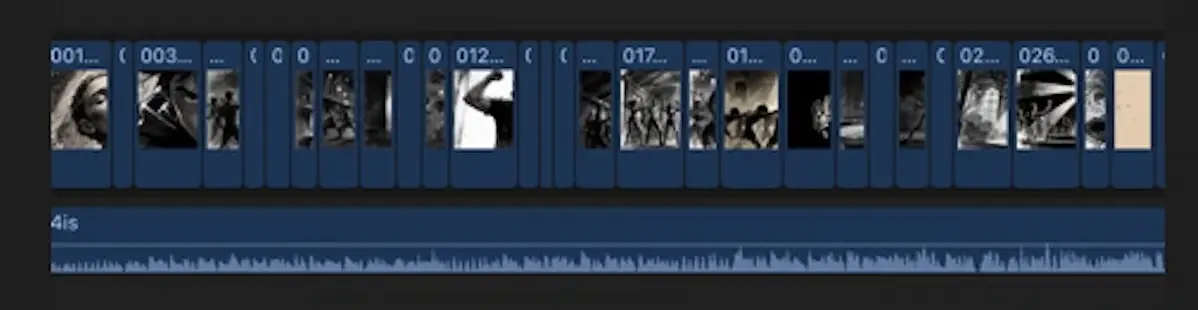
You end up with one aligned timeline per video, in minutes of attention each, and then you spend your finishing time on pacing, sound and graphics. See the step-by-step help article. The app doesn't write scripts, record voices or generate footage; it aligns your numbered media to your narration. It needs Final Cut Pro 10.5+ and an Apple Silicon Mac. Subtitles and the first two exports are free, and full access is $19 early access.
The packaging batch
Do all titles, thumbnails, descriptions and chapters together; the decisions are the same kind and benefit from comparison. Chapters need a 0:00 first timestamp, at least three entries in ascending order, and a minimum length of 10 seconds each, per YouTube's help. Then schedule uploads across the next few weeks.
A one-weekend, four-video template
| Block | Time | Task |
|---|---|---|
| Friday evening | 1.5 h | Pick four scripts from the bank; finalize outlines |
| Saturday morning | 3 h | Write or finish the four scripts; read aloud |
| Saturday midday | 2 h | Record all four voiceovers; export; label files |
| Saturday afternoon | 3 h | Collect and number visuals into four folders |
| Sunday morning | 2 h | Generate SRTs, run each folder through the aligner, import four timelines |
| Sunday afternoon | 4 h | Finish: pacing, sound, graphics (about an hour each) |
| Sunday evening | 1.5 h | Titles, thumbnails, descriptions, chapters; schedule uploads |
These hours are a planning template, not a benchmark; your first batch will run longer and your fifth shorter. Measure each block and adjust.
QA checklist
Before scheduling anything:
- Count match: SRT blocks equal asset count for every video.
- SRT sanity: no fragment-length blocks, no merged sentences.
- Fact check: every claim and number against a source.
- Rights: license for every clip, image and track.
- Disclosure: realistic synthetic content labelled in YouTube's upload flow.
- Differentiation: each video has its own script and editing choices, not a swapped-in template. YouTube treats repetitive or mass-produced content as ineligible for monetization.
- Audio levels consistent across the batch.
FAQ
How many videos should I batch at once? Start with two or three; four is a comfortable weekend for a practiced creator. Add more only when each batch runs smoothly.
Does batching hurt quality? It can if you rush. The fix is the QA checklist and keeping creative judgment (scripting, pacing, packaging) human. Batching removes setup overhead, not thinking.
Can AI do the whole batch? AI tools can batch short-form video creation, as Syllaby describes, but fully automated, templated output risks the repetitive-content policy, and the result rarely has a point of view. For a comparison, see MatchCut FCP vs AI Video Generators.
Does this work for a faceless channel? It's ideal for one. See How to Start a Faceless YouTube Channel.
What about podcasts? See How to Turn a Podcast Episode Into a YouTube Video.
Make the edit the easy part
If assembly is where your batch stalls, download the beta and run your next four folders through it, or get early access for $19.
Sources
Accessed 2026-10-16.
- Trena Little — Beginner's guide to batching YouTube content · BrandGhost — YouTube bulk scheduling · Natasha Lane Design Co. — How to batch create YouTube videos
- Syllaby — AI batch creation of short-form video · Tom Kim — LinkedIn
- YouTube Help — Add chapters · Disclosing altered or synthetic content · Channel monetization policies